Highlight

Successful together – our valantic Team.
Meet the people who bring passion and accountability to driving success at valantic.
Get to know usFlexible. Transparent. Secure.
Multifaceted changes present new challenges for HR work: The digital transformation, artificial intelligence and people analytics, the skilled labor shortage, and demographic change will shape the future of the world of work.

The challenge of daily HR work is to align modern HR management, administrative tasks, data, HR systems, and operational processes, and to integrate them seamlessly. The key task is to strike the right balance between using state‑of‑the‑art technologies, optimizing processes, and providing transparent services for employees, while leveraging data effectively to secure the company’s long‑term future. The fulfillment of legal, wage, and operational requirements and adherence to data protection is not just a requirement, but a given – ideally at predictable, fair, and transparent costs. HCM Inside helps realign, digitize, and simplify SAP time management.
HCM Inside has all the necessary functions to support time management in the Fiori environment:
Time management
Easily record check-in and check-out times via the Fiori app.
Attendances/ absences
Many attendance and absence types can be requested via the Fiori app, for example vacation, bonus payments under collective agreements, or business trips.
Overtime
Request necessary overtime for yourself or for employees, with workflow control via the Fiori app – even retroactively.
Time shifts
Request payment or reallocation of flexitime credits for yourself or for employees, with workflow control via the Fiori app.
On-call duty
Apply for on‑call duty, for example on Saturdays or Sundays, for yourself or for employees, with workflow control via the Fiori app.
Additional working time management functions for enhanced transparency and analysis:
Information for managers
Comprehensive overview of birthdays, anniversaries, balances, and employees’ time cards.
Department calendar
Maintain an overview of all absences within your team or across all employees in the company.
Analysis reports
Detailed analysis options, e.g. time sheets, balance overviews, A1 certificates, or customized reports.
Task management
Simple, efficient, and fast processing of incoming tasks for the respective ESS/MSS processes.
Applications
An informative overview of all applications and their status at all times.
Substitute function
Set up substitution rules for absences, e.g. vacation, illness, etc.
Fiori Launchpad
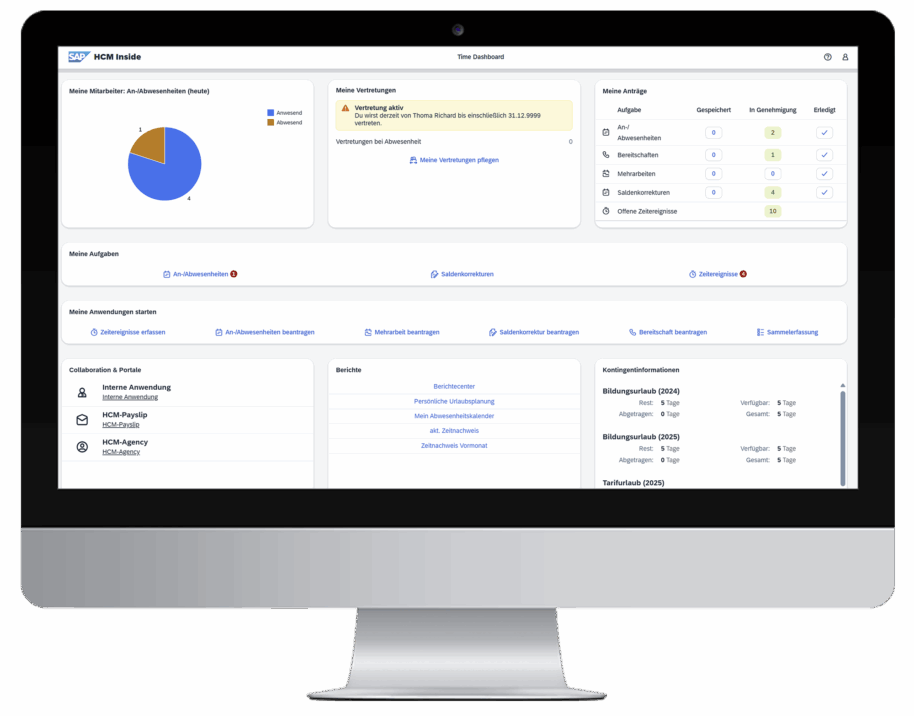
The HCM Inside Fiori Launchpad provides a real-time view of all important data from SAP Time Management. It can also be seamlessly integrated into an existing Fiori landscape.
HCM Inside
Learn more about how you can get the maximum benefit and added value from your SAP time management with HCM Inside!
Increase the benefits of your SAP HCM system!
From entering and requesting attendances and absences, overtime, reallocations, and access, through approval and the creation of evaluations and time cards via ESS/MSS scenarios, HCM Inside provides workflow‑based, transparent, and efficient processes in your SAP HCM system. The synchronous data interface to SAP Time management (PT) provides you with a view of all SAP time management data in real time.
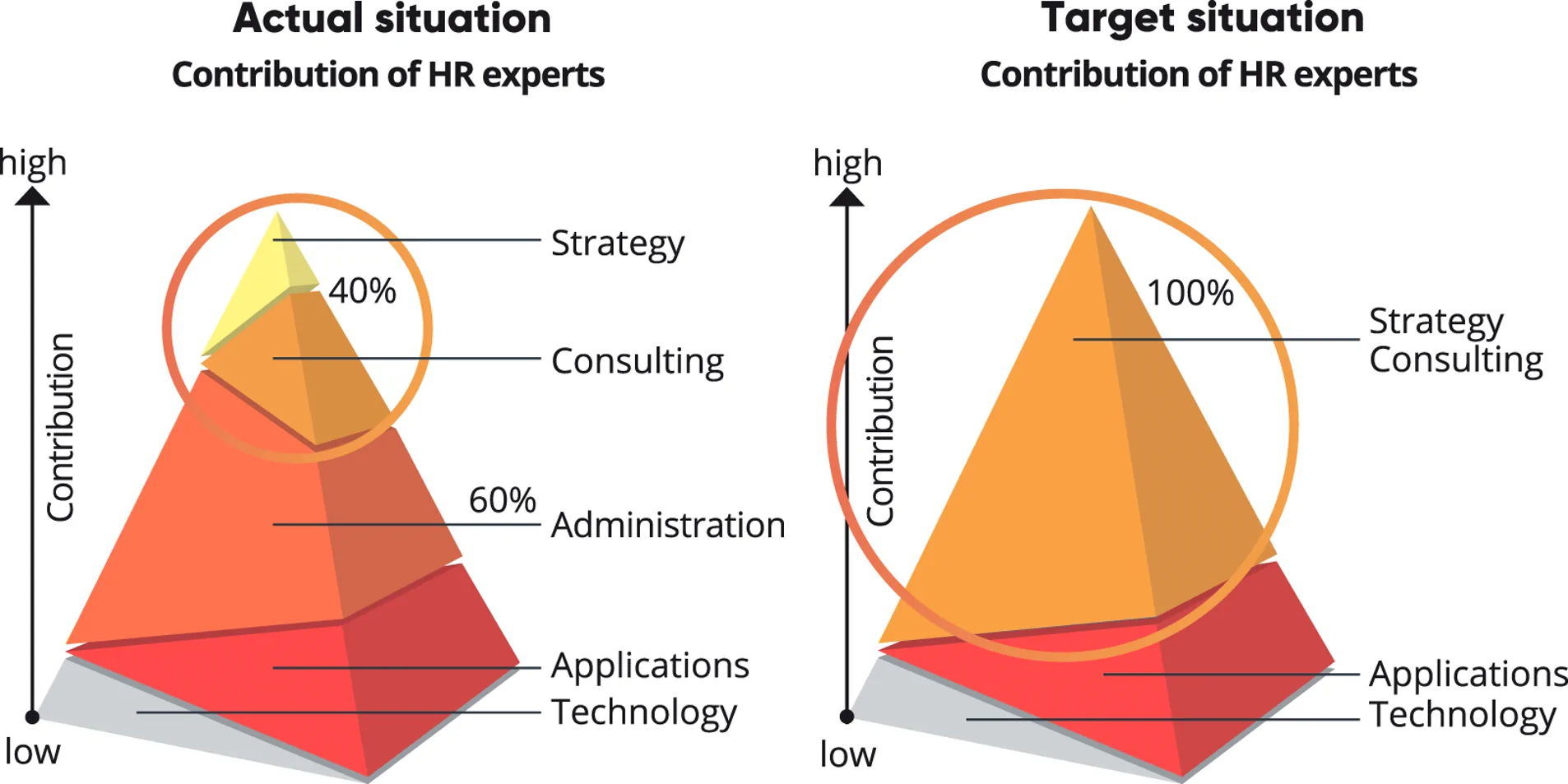
Individually configurable
HCM Inside can be configured according to your specific requirements and and easily adapted to your company’s needs.
HCM Inside Fiori Launchpad
Company-wide provision of time management processes to all employees via the HCM Inside Fiori Launchpad.
Audit‑compliant data storage
Save the complete workflow and approval process to ensure audit compliance and data security in your document management system, e.g. SAP Archive.
Save time and money
HCM Inside includes all important time management processes in a Fiori app and helps with the digital transformation of HR processes. Reduce administrative activities and processing times and achieve significant cost savings.
Keep data up-to-date
The synchronous data interface to SAP time management ensures access to your master data in real time.
Environmentally friendly
Environmental protection is important to us – so we avoid unnecessary printing of your forms.
With HCM Inside, you will take an important step toward the digital transformation of your company. Where many activities were previously managed using paper‑based applications, digital ESS/MSS processes in the HCM Inside web portal allow you to sustainably optimize these business processes.
Allow your employees to enter their applications and tasks themselves at any time on their PC, laptop or mobile devices such as smartphones, tablets, etc.
The manager is informed of the request by email and can process, reject, or approve it online. This completely eliminates errors that can occur due to due to manual processes and media breaks, such as typing or calculation errors when manually transferring data from paper applications. All requests submitted via the ESS/MSS process, together with the respective process status, can be viewed by the requester and/or approver at any time in your SAP time management system. The current time statement and various evaluations can be called up by the employee or manager at any time.
Of course, employees without access to the HCM Inside Fiori Launchpad can also enter requests on behalf of their manager, the time administrators, or the secretariat.
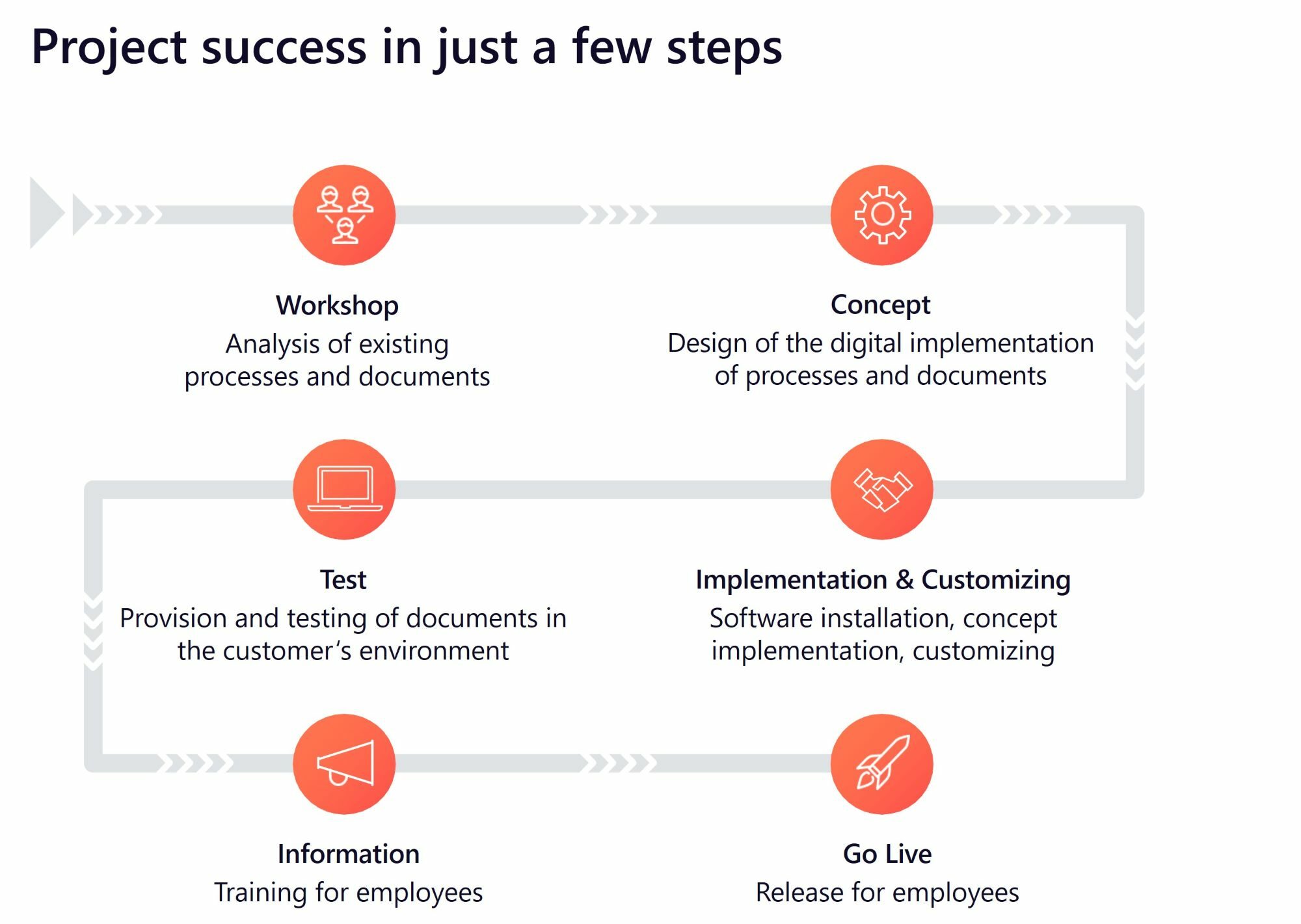
The implementation of HCM Inside follows clearly defined and customized project steps.
In an initial kickoff workshop with valantic experts and customers, the current situation is analyzed and a project concept is defined. In accordance with this concept, the software is installed and customized as defined. This is followed by tests in the customer environment and the training of key users, before HCM Inside goes live. The valantic experts are also available afterwards for further questions as well as customizations or extensions.
HCM Inside provides you with the following standard use cases:
Digital time management refers to the use of digital technologies and software solutions to record, manage, and analyze working times and resources in companies. It enables efficient planning and control of work processes.
Digital time management enables companies to increase productivity, reduce costs, ensure compliance with working‑time regulations and increase transparency in time recording. It enables better resource planning.
There are various software solutions and tools that can be used for digital time management, including time recording software, project management tools, HR management systems, and mobile apps for time management.
Data security and data privacy are essential, as sensitive employee data must be protected. Time management software uses advanced security and access protection measures to ensure data protection.
Yes, many tools also offer the option of recording and managing working hours from mobile devices. This is particularly useful for sales representatives or companies with flexible working models.
HCM Inside
Learn more about how you can get the maximum benefit and added value from your SAP time management with HCM Inside!